
You built a website, added content, and maybe even tried SEO, but your website is still not ranking on Google. This is a common problem for many businesses. The good news is that ranking issues usually come from a few clear mistakes that can be fixed.
Google ranks websites that are fast, helpful, easy to use, and trusted. If your website misses any of these, rankings suffer.
Quick Answer: Why Is My Website Not Ranking on Google?
A website does not rank on Google due to technical SEO issues, slow speed, weak content, poor keyword targeting, or bad user experience. Fixing these problems with proper SEO, content optimization, and website improvements can help rankings improve over time.
Common Reasons Business Websites Don’t Rank
Many websites struggle because of basic issues that are easy to overlook.
Top reasons your website may not rank:
- Poor technical SEO setup
- Slow website speed
- Weak or thin content
- Wrong keywords
- Bad mobile experience
Even one of these problems can block your rankings.
Technical SEO Issues That Hurt Rankings
Technical SEO helps Google crawl, understand, and index your website. If technical SEO is broken, Google may ignore your site.
Common technical SEO problems:
- Pages not indexed properly
- Broken links
- Duplicate pages
- Missing meta titles and descriptions
- Poor website structure
Why technical SEO matters:
Google cannot rank pages it cannot crawl or understand. Technical SEO builds the foundation for all other SEO work.
Basic technical SEO checklist:
- Clean URL structure
- XML sitemap
- Proper internal linking
- Secure HTTPS website
Without technical SEO, content alone will not rank.
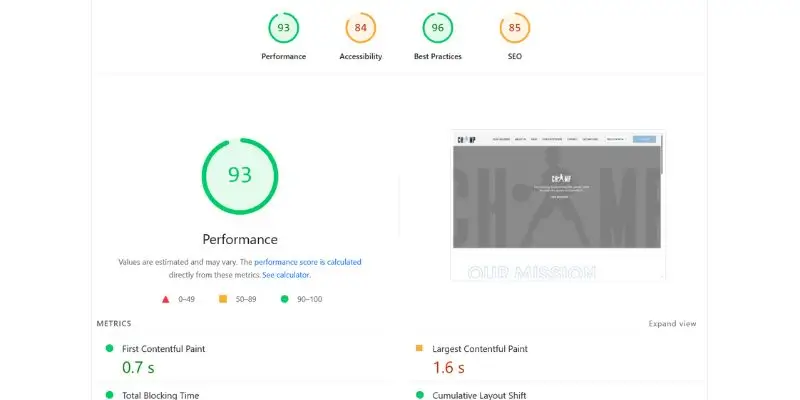
Website Speed Issues and SEO Impact
Website speed is a ranking factor. Slow websites lose traffic and rankings.
How speed affects rankings:
- Users leave slow websites
- Bounce rate increases
- Google lowers rankings
Common speed problems:
- Large images
- Too many scripts
- Poor hosting
- No caching
Speed and SEO Connection
| Speed Issue | SEO Impact |
|---|---|
| Slow loading | Lower rankings |
| High bounce rate | Less trust |
| Poor mobile speed | Ranking drops |
Improving speed often leads to quick ranking improvements.
Content and Keyword Problems
Content is one of the most important ranking factors. Many websites fail because their content is not helpful or targeted.
Common content mistakes:
- Writing for Google, not users
- Using wrong keywords
- Keyword stuffing
- Thin content
- Copying content from others
Why keyword choice matters:
If you target keywords no one searches—or keywords that are too competitive—your website will struggle.
Good SEO content should:
- Answer real questions
- Use clear language
- Match search intent
- Include related keywords naturally
Helpful content ranks better than long content.

User Experience and Mobile SEO Issues
Google watches how users interact with your website.
UX problems that hurt rankings:
- Confusing navigation
- Hard-to-read text
- No clear call-to-action
- Pop-ups blocking content
Mobile SEO matters more than ever:
Google uses mobile-first indexing. If your mobile website is poor, rankings drop even on desktop searches. Mobile issues include slow load times, small buttons, and content not fitting the screen.
Why Your Website Is Not Ranking Locally
For local businesses, local SEO issues are common.
- No Google Business Profile
- Inconsistent business details (NAP)
- No local keywords
- No location-based content
Practical Fixes That Improve Rankings
You do not need to fix everything at once. Start with the biggest problems.
Step 1: Fix Technical SEO
- Ensure pages are indexed
- Fix broken links
- Improve site structure
Step 2: Improve Website Speed
- Compress images
- Reduce scripts
- Use better hosting
Step 3: Improve Content Quality
- Update old content
- Add helpful details
- Use clear headings
Step 4: Target Better Keywords
- Focus on long-tail keywords
- Match user intent
- Avoid keyword stuffing
Step 5: Improve UX and Mobile
- Simplify navigation
- Improve readability
- Fix mobile issues
How SEO Services Help Fix Ranking Problems
Professional SEO services look at the full picture. Businesses working with Web and Digital Solutions often see faster improvements because SEO, website optimization, and content strategy are handled together.
How Long Does It Take to Fix Ranking Issues?
- 2–4 weeks: Technical fixes
- 1–3 months: Content updates
- 3–6 months: Strong ranking growth
Mistakes to Avoid While Fixing SEO
- Changing everything at once
- Using shortcuts or spam tactics
- Ignoring mobile users
- Writing content only for search engines
Final Thoughts: Ranking Problems Can Be Fixed
Most websites do not rank because of fixable problems not because SEO does not work. Audit your website honestly and fix one issue at a time to help your business rank higher on Google.