Google has officially rolled out its AI-powered configuration for Search Console. This tool allows users to build complex performance reports using simple natural language prompts, drastically reducing the time spent on manual filtering.
For years, analyzing performance data in Google Search Console (GSC) meant manually clicking through dozens of filters just to find a single “aha!” moment. At Web and Digital Solutions, we’ve seen how this time-sink can prevent business owners from actually acting on their data.
That officially changes today. Google has announced the global rollout of its AI-powered configuration tool, making data analysis more intuitive than ever. As Google recently shared on LinkedIn, this feature is now available to everyone to help streamline their SEO workflows.
What is AI-Powered Configuration?
Instead of hunting for the “Query contains” or “Compare date ranges” buttons, you can now simply talk to your data. According to the official Google Search Central Blog, the tool translates natural language into technical report settings.
The AI handles three core tasks for you:
- 1. Metric Selection: Automatically displays Clicks, Impressions, CTR, or Position based on your question.
- 2. Smart Filtering: Narrows data by query, page, country, device, and even search appearance.
- 3. Complex Comparisons: Sets up year-over-year or month-over-month views instantly.
Pro Agency Tip: 5 Prompts to Try Right Now
To get the most out of this update, try entering these specific prompts into your GSC Performance report sidebar:
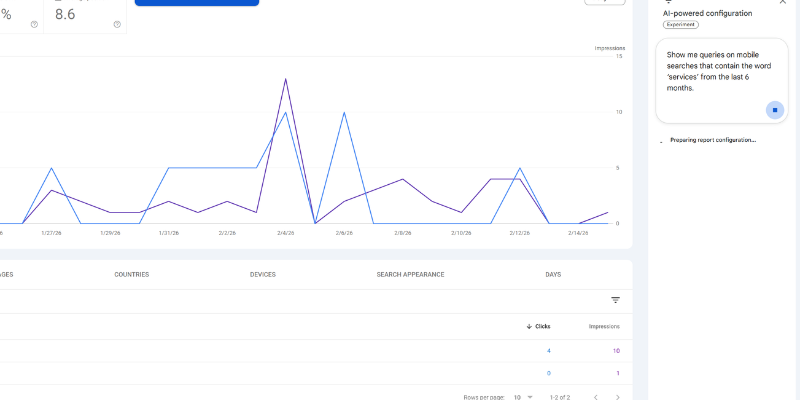
- “Show me queries on mobile searches that contain the word ‘services’ from the last 6 months.”
- “Compare traffic for pages containing ‘/blog’ in this quarter vs. the same quarter last year.”
- “Show me the Average CTR and Position for my queries in Canada over the last 28 days.”
- “List pages that include the word ‘AI’ and show their impressions.”
- “Which queries have a high impression count but a CTR below 2%?”
Why This Matters for Your Digital Strategy
In the world of Web and Digital Solutions, speed is your greatest competitive advantage. Here is why this update is a game-changer for 2026:
1. Accessibility for Small Businesses
You no longer need to be a technical SEO expert to understand your traffic. Business owners can now get deep insights by asking a question, bridging the gap between raw data and business growth.
2. Faster Decision Making
Instead of spending 10 minutes configuring a single report, you get your answers in seconds. This allows more time for optimizing your content and less time on administration.
3. Uncovering Hidden Trends
Because it is so easy to ask “What if?” questions, you are more likely to find niche keywords or sudden performance dips that manual filters might miss.
How to Find the AI Tool
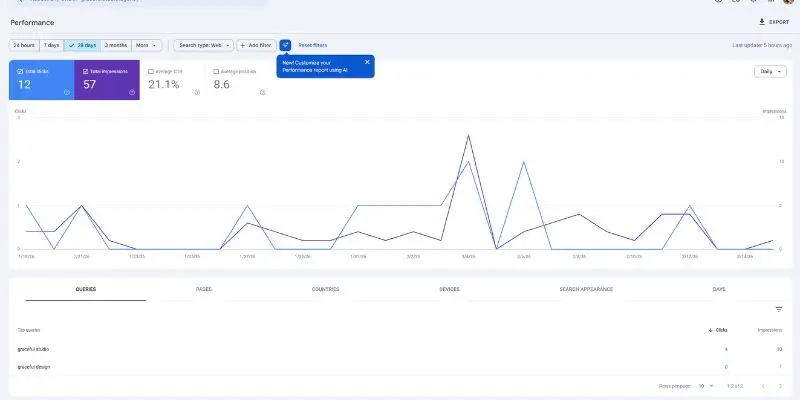
When you log into your Search Console Performance Report, look for a small banner at the top:
“New! Customize your Performance report using AI.”
Clicking this will open a prompt bar. Currently, this is limited to Search Results data (it does not yet support Discover or News), but it is a massive step toward a conversational SEO future.
Frequently Asked Questions (FAQ)
How do I enable the AI configuration in Google Search Console?
It is rolled out automatically. Just visit your Performance report; if your account is eligible, you will see a “Customize using AI” banner at the top.
Is the GSC AI tool available for all websites?
Yes, Google has moved this feature from “experimental” to a global rollout as of February 2026.
Does this AI tool change my actual SEO rankings?
No. This tool helps you analyze your data faster, but it does not directly change how Google ranks your website.
The Verdict: A Powerful SEO Assistant
While AI isn’t a replacement for a human-led strategy, it is an incredible assistant. As Google continues to integrate Gemini models into tools like GSC and AI Search Optimization, the barrier to high-level digital marketing is finally coming down.
Have you tried the new AI prompt yet? Let us know in the comments how it’s changing your reporting!