
Have you ever discovered that multiple pages on your website contain the same or almost identical information?
Duplicate content is a common SEO issue, especially on websites with multiple service pages, ecommerce product variations, location pages, and different URL versions.
But does duplicate content hurt SEO?
The short answer is that duplicate content does not automatically result in a Google penalty. Google can identify similar pages and generally attempts to select one representative URL to display in search results.
However, duplicate content can create problems when multiple URLs compete to represent the same information, canonical signals are inconsistent, or your website contains several pages that offer little additional value.
The important distinction is between having similar content and creating a website structure that makes it difficult for search engines to identify the preferred pages.
In this guide, we explain how duplicate content affects SEO, how to find duplicate pages, and how to fix them using canonical tags, redirects, and content consolidation.
Does Duplicate Content Hurt SEO Rankings?
Duplicate content does not automatically hurt your rankings or trigger a Google penalty.
Google’s systems generally try to identify duplicate or substantially similar pages and select a canonical URL to represent them in search results.
For example, consider these two URLs:
https://example.com/seo-services/https://example.com/seo-services/?source=campaign
If both URLs display essentially the same content, Google may recognise them as duplicate versions and select one URL as the canonical version.
This is usually manageable when your preferred URL is clear.
However, duplicate content can create SEO challenges when:
- Multiple versions of the same page are accessible.
- Important pages have inconsistent canonical tags.
- Internal links point to different URL versions.
- Duplicate pages are unnecessarily included in search results.
- Similar pages provide little additional value.
- Google selects a different canonical URL from the one you intended.
The objective is not to eliminate every instance of similar wording across your website. It is to maintain a clear structure and help search engines identify the most appropriate version of each important page.
What Is Duplicate Content in SEO?
Duplicate content refers to substantial blocks of content that are identical or very similar across multiple URLs, either within the same website or across different websites.
There are three common types.
1. Exact Duplicate Content
Exact duplicate content occurs when the same text appears on multiple URLs.
For example:
example.com/services/seo/example.com/seo-services/
If both pages contain essentially the same service description, headings, and information, they may be considered duplicate or substantially similar pages.
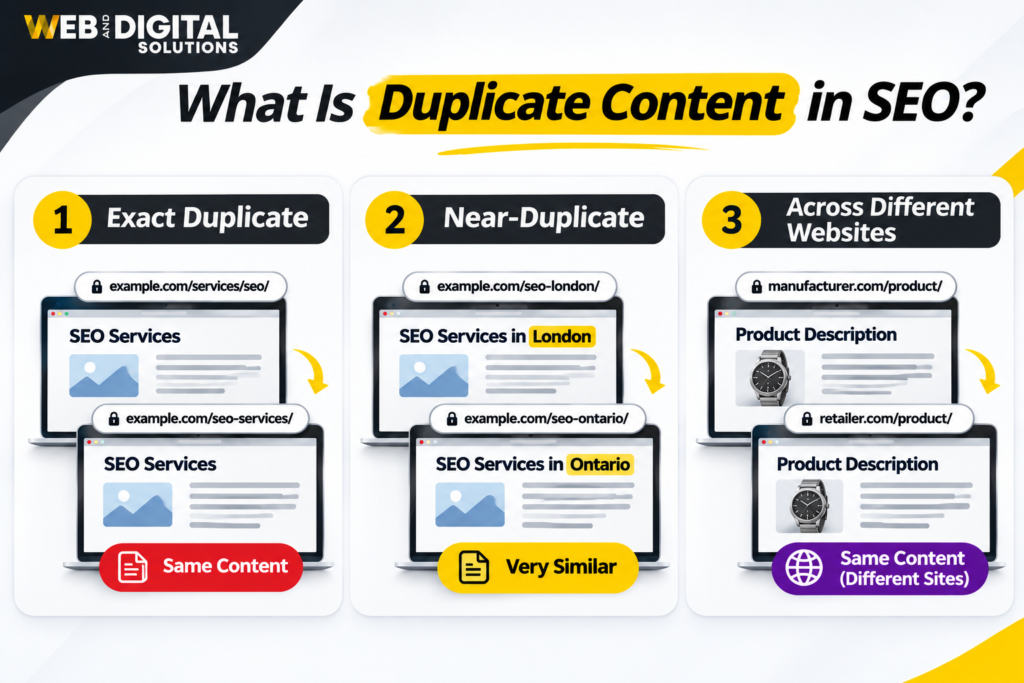
2. Near-Duplicate Content
Near-duplicate content refers to pages that are not completely identical but share a large amount of similar information.
For example, a business might create separate pages for different service locations using the same introduction, service descriptions, headings, and calls to action, changing only the city name.
Although the URLs are different, the actual content offers very little distinction.
3. Duplicate Content Across Different Websites
Duplicate content can also appear across separate domains.
For example, a manufacturer may provide product descriptions that multiple retailers publish without making meaningful changes.
Similarly, a business may publish the same article on its website and another publishing platform.
This does not automatically result in a penalty, but search engines still need to determine which version is most appropriate to display for a particular search.
Common Causes of Duplicate Content on Websites
Duplicate content is not always intentional. It can result from website settings, content management systems, URL structures, and publishing practices.
1. HTTP and HTTPS Versions
A website may accidentally make both HTTP and HTTPS versions accessible.
For example:
http://example.com/https://example.com/
If both versions load the same content without appropriate redirects and canonicalisation, search engines may encounter multiple URLs for the same page.
Ideally, your website should use HTTPS consistently and redirect HTTP requests to the preferred HTTPS version.
2. WWW and Non-WWW URL Variations
Websites can also be accessible through both www and non-www versions.
For example:
https://www.example.com/services/https://example.com/services/
Both URLs may display the same content.
Choose one preferred domain version and configure the other to redirect to it consistently.
3. Trailing Slash and Non-Trailing Slash URLs
Some websites allow both versions of a URL:
https://example.com/seo-services/https://example.com/seo-services
Depending on the server and website configuration, both may resolve to the same content.
Use a consistent URL format and ensure the preferred version is reflected in redirects, canonical tags, and internal links.
4. URL Parameters and Tracking URLs
URL parameters are frequently used for advertising campaigns, analytics, filtering, and website functionality.
For example:
example.com/services/seo/example.com/services/seo/?utm_source=facebookexample.com/services/seo/?campaign=spring
These URLs may display identical content while using different query parameters.
Tracking parameters do not automatically create a serious duplicate-content problem. However, unnecessary URL variations should be handled consistently so search engines can identify the preferred page.
5. Ecommerce Product Variations
Ecommerce websites often have duplicate or near-duplicate content because of product variations.
For example, an online clothing store may have separate URLs for the same shirt in different colours:
/products/blue-cotton-shirt//products/black-cotton-shirt//products/white-cotton-shirt/
If these pages contain almost identical descriptions and differ only in a product attribute, search engines may treat them as substantially similar.
The right approach depends on the website structure and search demand.
If each variation has meaningful search value and distinct information, separate pages may be appropriate. Otherwise, a consolidated product page with selectable variations may be more suitable.
6. Duplicate Location Pages
Businesses serving multiple locations sometimes create several landing pages with nearly identical content.
For example:
- SEO Services London Ontario
- SEO Services Woodstock Ontario
- SEO Services St. Thomas Ontario
Creating location-specific pages is not inherently wrong. The issue arises when each page simply replaces the city name while retaining almost identical content.
Useful location pages should provide meaningful local information, such as:
- Services available in that location.
- Relevant customer requirements.
- Local service coverage.
- Location-specific examples or projects, where available.
- Relevant business information.
- Useful answers to location-related questions.
Each page should provide a genuine reason to exist.
7. Content Published on Multiple URLs
Duplicate content can also occur when an article is accessible through multiple website paths.
For example, a blog post may appear under both a category URL and a separate blog URL, depending on the CMS configuration.
Review your website’s URL structure to ensure that the same article does not unintentionally resolve through multiple addresses.
How to Find Duplicate Content on Your Website
Before fixing duplicate content, identify where it exists and understand why the pages are duplicated.
Here are practical methods for finding duplicate pages.
1. Use Google Search Console
Google Search Console is one of the most useful tools for investigating indexing and canonicalisation issues.
Open the Page Indexing report and review relevant categories, including:
- Duplicate without user-selected canonical.
- Duplicate, Google chose different canonical than user.
- Alternate page with proper canonical tag.
These statuses can help identify URLs that Google considers duplicate versions or alternate pages.
You can also use the URL Inspection tool to check:
- Whether a URL is indexed.
- The user-declared canonical URL.
- The Google-selected canonical URL.
- The latest crawl information.
Pay attention to the difference between the canonical URL you specify and the one Google selects.
If they do not match, investigate why Google may consider another URL a better representative.
2. Use a Website Crawler
SEO crawling tools such as Screaming Frog SEO Spider can help identify duplicate and near-duplicate pages across your website.
A crawl can help you review:
- Duplicate page titles.
- Duplicate meta descriptions.
- Similar or identical page content.
- Canonical tags.
- Redirect chains.
- Multiple URL variations.
- Pages with inconsistent internal links.
Remember that duplicate title tags and meta descriptions are not the same as duplicate main content. They are useful indicators for investigation, but they do not independently prove that two pages contain duplicate content.
3. Search Your Website Using Google
You can use Google’s site: search operator to investigate whether similar content appears across multiple indexed URLs.
For example:
site:example.com "your exact content phrase"
This may help identify pages containing the same wording.
You can also search for a distinctive sentence from an article or service page.
However, Google search operators do not provide a complete or definitive duplicate-content audit. Search results may not show every relevant URL.
Use this method as an initial check rather than your only diagnostic tool.
4. Compare Pages Manually
Automated tools can identify similarities, but manual review is important.
Open the suspected duplicate pages and compare:
- Main page content.
- Headings and subheadings.
- Service descriptions.
- Product information.
- Images and supporting details.
- Search intent.
- Internal links.
- Calls to action.
Ask one important question:
Does this page provide unique value to the visitor, or does it simply repeat information already available elsewhere on the website?
This helps determine whether the pages should remain separate, be improved, or be consolidated.
How to Fix Duplicate Content Issues
Once duplicate pages have been identified, choose a solution based on the reason the pages exist.
Not every duplicate-content issue requires deleting a page or adding a canonical tag.
1. Implement Canonical Tags
A canonical tag tells search engines which URL you consider the preferred version when multiple URLs contain the same or substantially similar content.
For example, if these two URLs display the same page:
https://example.com/seo-services/https://example.com/seo-services/?campaign=summer
You can specify the preferred URL using a canonical tag:
<link rel="canonical" href="https://example.com/seo-services/" />Place the canonical tag in the page’s HTML head section.
Canonical tags are useful for:
- URL parameter variations.
- Ecommerce product variations.
- Duplicate category pages.
- Similar content accessible through multiple URLs.
- Syndicated or republished content, where appropriate.
Important considerations:
- Canonical tags are signals, not absolute commands.
- Google may select a different canonical URL.
- Canonical tags should point to accessible, relevant URLs.
- Avoid canonicalising unrelated pages to a single URL.
- Keep internal links consistent with the preferred URL.
For most unique pages, a self-referencing canonical tag is also a useful way to reinforce the preferred URL.
2. Set Up 301 Redirects
A 301 redirect is generally appropriate when one URL has permanently moved to another and the old URL should no longer function as a separate page.
For example:
https://example.com/old-seo-page/
can redirect to:
https://example.com/seo-services/
Use redirects when:
- You have permanently changed a page URL.
- Two overlapping pages are being consolidated.
- An old page has been replaced by a better version.
- Multiple URL versions need to resolve to one preferred version.
Redirects help users and search engines reach the intended destination.
Avoid redirecting unrelated pages simply to remove duplicate URLs. The destination should be relevant to the original page.
3. Consolidate Similar Content
Sometimes two or more pages target nearly identical search intent and provide very similar information.
Instead of maintaining several weak pages, consider combining them into one comprehensive resource.
For example, imagine your website has:
/seo-audit-services//technical-seo-audit/
If both pages target the same audience, describe essentially the same service, and offer no meaningful distinction, consolidating them may create a stronger page.
A consolidation process should include:
- Identify the primary page to retain.
- Review useful information from the other pages.
- Combine relevant content without repetition.
- Update internal links to point to the retained page.
- Redirect discontinued URLs when appropriate.
- Update the sitemap and canonical signals.
The objective is to create one useful page rather than several competing versions.
4. Rewrite Thin or Near-Duplicate Location Pages
If your website contains multiple location pages, review whether each page provides enough unique information.
Avoid simply replacing the location name in the same paragraph.
Instead, improve the pages with genuinely relevant details, such as:
- Local customer needs.
- Services offered in the area.
- Geographic service coverage.
- Relevant local examples.
- Location-specific questions.
- Useful information about how customers can access the service.
Do not create local claims, testimonials, project examples, or business addresses that cannot be verified.
If two location pages cannot provide distinct value, consider whether both pages need to exist.
5. Use Noindex Only When Appropriate
A noindex directive tells search engines not to include a page in their search results.
It may be suitable for certain pages that need to remain accessible to users but should not appear in organic search, depending on the website’s requirements.
However, noindex is not a universal duplicate-content solution.
Before using it:
- Confirm that the page genuinely does not need organic visibility.
- Check whether the page is required for website functionality.
- Review internal links and navigation.
- Make sure the page is not an important landing page.
- Understand how the directive affects crawling and indexing.
Do not use noindex on important pages simply because they contain some similar information.
6. Keep Internal Links Consistent
Internal links should point to the preferred version of each page.
For example, if your preferred URL is:
https://example.com/seo-services/
Avoid linking internally to alternate versions such as:
https://example.com/seo-services/?ref=old
Review:
- Navigation menus.
- Footer links.
- Blog links.
- Breadcrumbs.
- Related service sections.
- XML sitemap URLs.
Consistent internal linking reinforces your preferred website structure and reduces unnecessary URL variations.
Canonical Tags vs 301 Redirects vs Content Consolidation
These methods solve different problems. Choosing the correct one is important.
| Method | What it does | When to use it |
|---|---|---|
| Canonical tag | Signals the preferred URL among duplicate or similar versions | When multiple URLs need to remain accessible |
| 301 redirect | Permanently sends users and search engines to another URL | When an old URL has been replaced or permanently moved |
| Content consolidation | Combines overlapping content into one more useful page | When multiple pages serve the same purpose or search intent |
| Noindex | Requests that a page not appear in search results | When a page should remain accessible but should not be indexed |
The correct solution depends on the purpose of the page and whether it needs to remain accessible as a separate URL.
Can Duplicate Content Cause Keyword Cannibalisation?
Duplicate content and keyword cannibalisation are related, but they are not the same issue.
Duplicate content involves identical or substantially similar content appearing across multiple URLs.
Keyword cannibalisation is commonly used to describe situations where multiple pages target the same or very similar search intent and compete for visibility.
For example, a website might have three articles:
- What Is Technical SEO?
- Technical SEO Explained for Beginners.
- A Complete Guide to Technical SEO.
If all three pages cover almost identical topics and target the same audience, they may overlap significantly.
This does not mean Google automatically penalises the website. However, the pages may make it harder to establish a clear primary resource for that search intent.
To address this:
- Review the keywords and search intent of each page.
- Identify whether the pages serve different user needs.
- Consolidate overlapping content where appropriate.
- Differentiate pages that have genuinely separate purposes.
- Improve internal linking to clarify the relationship between related content.
A well-organised content structure should make the purpose of each important page clear.
Does Duplicate Content Affect Ecommerce Websites?
Ecommerce websites are particularly likely to encounter duplicate or near-duplicate content because of product variations, filters, sorting options, and category URLs.
For example, an online store may generate multiple URLs for:
- Different product colours.
- Different product sizes.
- Price sorting.
- Product filtering.
- Pagination.
- Session or tracking parameters.
Not every variation is a problem.
The important step is to determine which URLs offer unique search value and which are unnecessary variations of the same content.
Practical ecommerce SEO recommendations include:
- Use consistent canonical URLs.
- Keep important product and category pages accessible.
- Avoid unnecessary indexable filter combinations.
- Write useful product descriptions.
- Maintain clear category structures.
- Use consistent internal linking.
- Review how the ecommerce platform generates URLs.
Do not automatically canonicalise every product variation to the main product page. Some variations may have distinct search demand and deserve their own indexable pages.
The correct configuration depends on the product structure and the value of each page.
How Often Should You Check for Duplicate Content?
Duplicate-content checks should be part of your regular technical SEO process, particularly after major website updates.
Consider reviewing duplicate content:
- During an initial SEO audit.
- After a website redesign.
- Following URL structure changes.
- When launching new service or location pages.
- After adding ecommerce filters or product variations.
- When Search Console reports canonicalisation issues.
- When publishing content across multiple platforms.
A regular crawl can help identify newly created URL variations, duplicate titles, and pages with similar content before they become larger website management issues.
How Web & Digital Solutions Helps Fix Duplicate Content Issues
At Web & Digital Solutions, we treat duplicate content as part of a broader technical SEO and website quality review.
The objective is to identify whether duplicate pages are affecting crawling, indexing, canonical selection, or the usefulness of your website’s content.
Our SEO services can include:
- Technical SEO audits: Identifying duplicate URLs, indexing issues, and website structure problems.
- Canonical tag reviews: Checking whether preferred URLs are correctly specified.
- Redirect analysis: Identifying unnecessary redirects and outdated URLs.
- Content audits: Finding duplicate and near-duplicate website content.
- Keyword mapping: Reviewing pages that overlap in search intent.
- Content consolidation: Combining overlapping pages when appropriate.
- Internal linking optimisation: Directing links to the preferred pages.
- Performance monitoring: Reviewing indexing and organic search performance after implementation.
If your website has duplicate pages, inconsistent canonical tags, or unexplained indexing issues, a technical SEO audit can help identify the underlying causes.
Explore our SEO services in London, Ontario to learn more about our approach.
You can also contact Web & Digital Solutions to discuss your website’s technical SEO requirements.
Frequently Asked Questions About Duplicate Content and SEO
1. Does duplicate content hurt SEO rankings?
Duplicate content does not automatically result in a Google penalty. However, multiple versions of similar pages can create indexing and canonicalisation problems, divide signals, and make it harder for search engines to identify the preferred URL. The impact depends on how the pages are structured and managed.
2. Does Google penalise websites for duplicate content?
Google does not generally impose a penalty simply because duplicate content exists. However, deceptive practices intended to manipulate search rankings or mislead users may violate Google’s spam policies. Normal technical duplication and intentional manipulation are different situations.
3. How do I check for duplicate content on my website?
You can use Google Search Console, website crawling tools such as Screaming Frog SEO Spider, and manual content comparisons. Review duplicate URLs, canonical tags, page titles, and similar page content. Google Search Console’s Page Indexing report can also help identify canonicalisation issues.
4. What is the best way to fix duplicate content?
The right solution depends on why the duplicate pages exist. You may use canonical tags for alternate versions, 301 redirects for permanently replaced URLs, content consolidation for overlapping pages, or content improvements when pages need to serve different search intents.
5. Do canonical tags fix duplicate content issues?
Canonical tags signal which URL should be treated as the preferred version among duplicate or similar pages. However, they are hints rather than absolute directives. Google may choose a different canonical URL if other signals suggest another page is more appropriate.
6. Are duplicate location pages bad for SEO?
Location pages are not automatically harmful when they provide useful and distinct information for each area. However, pages that only replace city names while repeating nearly identical content may offer little value. Each location page should serve a genuine local purpose.
7. Can duplicate content affect ecommerce websites?
Yes. Ecommerce websites may generate duplicate or near-duplicate URLs through product variations, filters, sorting options, and tracking parameters. Consistent canonicalisation, URL management, and useful product content can help search engines identify the most appropriate pages to index.