A website can look professional, attract visitors and still fail to generate consistent enquiries. For many businesses, the problem is not a lack of traffic. It is what happens after someone arrives on the website.
A slow page, unclear service information, confusing navigation or a broken enquiry form can make potential customers leave before contacting the business. These issues are not always obvious, especially when the website appears to work normally during a quick review.
Understanding common website conversion problems is an important step towards improving website performance. By identifying where visitors experience friction, businesses can make informed improvements that support enquiries, sales and long-term growth.
1. Slow Page Loading That Tests Visitors’ Patience
Website speed affects the experience visitors have from the moment they click through to a page. If a page takes too long to load, users may leave before they see the service, product or information they came for.
Several factors can contribute to slow performance, including oversized images, unnecessary scripts, excessive plugins, inefficient hosting and poorly optimised code.
The impact can extend beyond user experience. Poor page performance can affect engagement and contribute to weaker conversion outcomes. Page experience is also relevant to SEO, although speed alone does not determine search rankings.
What to check:
- Test important landing pages using Google PageSpeed Insights.
- Review Core Web Vitals and real-user performance data where available.
- Compress oversized images and use appropriate image formats.
- Remove unnecessary scripts and plugins.
- Review hosting performance, caching and mobile loading speed.
The objective is not simply to achieve a perfect performance score. It is to make important pages fast, stable and usable for real visitors.
2. Visitors Cannot Immediately Understand What You Offer
When someone lands on a website, they should be able to understand what the business does, who it serves and how it can help them.
If the headline is vague, the messaging focuses too heavily on the company or the main service is difficult to identify, visitors may struggle to determine whether they are in the right place.
For example, a headline such as “Delivering Excellence Through Innovation” may sound professional, but it does not clearly explain the service being offered. A more specific headline that names the service and the customer benefit can communicate value more effectively.
What to improve:
- Use a clear headline that describes the primary offer.
- Explain the main customer benefit in plain language.
- Make the target audience clear where relevant.
- Support the headline with a short, useful explanation.
- Place a relevant call to action near the main message.
Clear positioning helps visitors make an early decision about whether to explore the website further.
3. Calls to Action Are Missing or Difficult to Find
A visitor may be interested in a service but still leave if the next step is unclear.
Calls to action (CTAs) guide users towards a meaningful action, such as requesting a quote, booking a consultation, calling the business or purchasing a product. If these actions are hidden, vague or inconsistent, visitors may have to work harder than necessary to proceed.
Buttons labelled “Click Here” or “Submit” may provide little context compared with action-oriented wording such as “Request a Quote” or “Book a Consultation,” where appropriate.
What to improve:
- Place a clear primary CTA in a prominent location.
- Use descriptive button labels.
- Repeat relevant CTAs at natural decision points on longer pages.
- Ensure buttons are easy to tap on mobile devices.
- Match the CTA to the visitor’s likely intent.
Avoid filling every section with competing buttons. One clear primary action, supported by secondary options when necessary, can create a more focused experience.
4. Broken Forms and Contact Options Prevent Enquiries
A contact form can appear normal while silently preventing potential customers from reaching the business. Validation errors, failed submissions, missing notifications, incompatible fields or technical conflicts can interrupt the enquiry process.
The same problem can occur with telephone links, booking tools, email links and checkout functionality.
These issues are particularly damaging because visitors may complete the work of deciding to contact the business but never successfully submit their enquiry.
What to check:
- Submit test enquiries from desktop and mobile devices.
- Confirm that required fields and validation work correctly.
- Verify that submission confirmation messages appear.
- Check that enquiry notifications reach the correct inbox.
- Test phone numbers, booking links and other contact options.
- Review spam filtering and form integrations if submissions are missing.
Testing should cover the complete journey, from filling out the form to confirming that the business actually receives the enquiry.
5. Confusing Navigation Makes Important Pages Hard to Find
Visitors should not have to search through multiple menus to find a core service, pricing information, contact details or supporting information.
Unclear labels, excessive menu items, inconsistent page structures and poorly organised content can make a website difficult to navigate. When users cannot find what they need, they may leave and look for a more convenient alternative.
What to improve:
- Keep the main navigation focused on important pages.
- Use familiar, descriptive menu labels.
- Group related services logically.
- Create clear internal links between relevant pages.
- Make contact options easy to locate.
- Review navigation on smaller screens as well as desktop.
A useful website structure helps visitors understand where they are, what is available and where to go next.
6. The Mobile Experience Is Treated as an Afterthought
A website may look polished on a desktop monitor but become difficult to use on a phone. Text may be too small, buttons may be crowded, forms may be awkward to complete or important content may be pushed too far down the page.
These problems can create unnecessary friction for visitors who prefer to browse or contact businesses on mobile devices.
What to check:
- Test pages on different mobile screen sizes.
- Ensure text is readable without unnecessary zooming.
- Check button spacing and tap targets.
- Confirm that forms work properly on mobile.
- Review image scaling, menus and sticky elements.
- Make key service information and contact options easy to access.
Responsive design should support the same essential tasks across devices, even when the layout changes.
7. Service Pages Do Not Answer the Questions Customers Have
A service page that only lists features or makes broad claims may not give visitors enough information to take the next step.
Potential customers often want to understand what a service includes, who it is suitable for, what the process involves and what distinguishes one provider from another. If those questions remain unanswered, visitors may hesitate or return to search results.
Thin or generic service content can also make it harder for search engines to understand the page’s relevance to specific searches.
What to improve:
- Explain the service and the problems it addresses.
- Describe the process and expected deliverables.
- Address relevant customer concerns and common questions.
- Include credible examples, proof or case studies where available.
- Link to related services and useful resources.
- Add a relevant CTA once visitors have enough information to act.
The goal is to help users make a more informed decision, not simply to increase the amount of text on a page.
8. Weak Trust Signals Create Unnecessary Doubt
Visitors may be interested in a service but hesitate when they cannot verify the business’s credibility. This can happen when a website has outdated information, no clear business details, unsupported claims or little evidence of previous work.
Trust is particularly important when the visitor is considering a high-value service or sharing personal information through a form.
What to improve:
- Provide accurate business and contact information.
- Display relevant testimonials with appropriate permission.
- Add genuine case studies or examples of completed work.
- Explain your process and what customers can expect.
- Keep service information and business details current.
- Use secure connections and appropriate privacy information.
Trust signals should be genuine and verifiable. Invented reviews, exaggerated claims and unsupported guarantees can damage credibility rather than improve it.
9. Poor Internal Linking Creates Dead Ends
Internal links help visitors move from general information to more specific pages. Without them, someone reading a useful article may have no clear route to a related service or contact page.
For example, a visitor reading about website performance problems may also need help with custom business website development. If the article offers no relevant next step, the opportunity to continue the journey may be missed.
What to improve:
- Link educational content to relevant service pages.
- Connect related articles where they add useful context.
- Use descriptive anchor text that explains the destination.
- Check for broken internal links.
- Ensure important pages are accessible through logical navigation.
Internal linking should help people discover relevant information naturally. Links should be useful to the reader rather than inserted solely to repeat keywords.
10. SEO Problems Bring the Wrong Visitors—or Too Few Visitors
A website may struggle to generate leads because it attracts too little relevant traffic, targets the wrong search intent or fails to make its service pages discoverable.
Potential issues include missing or duplicated title tags, unclear page targeting, crawlability problems, broken links, weak internal linking and content that does not answer the searcher’s needs.
Not every SEO issue is a conversion issue, but poor alignment between search intent and landing-page content can create a gap between visits and enquiries.
What to check:
- Review Google Search Console for impressions, clicks and relevant queries.
- Check whether important pages are indexed.
- Review titles, headings and page content for clarity and relevance.
- Confirm that each key page has a distinct purpose.
- Investigate technical errors and broken links.
- Make sure the landing page fulfils the promise made in the search result.
SEO and conversion optimisation should work together: attract relevant visitors and then give them a clear, useful path towards the action they came to take.
11. Intrusive Pop-Ups Interrupt the Customer Journey
Pop-ups can be useful when they offer relevant information at an appropriate moment. However, immediate overlays, repeated promotional messages and difficult-to-close windows can interrupt visitors before they understand the page.
On mobile devices, intrusive overlays may cover most of the available screen and make it difficult to access important content.
What to improve:
- Avoid showing unnecessary pop-ups immediately on arrival.
- Make closing controls obvious and functional.
- Ensure overlays work properly on mobile.
- Limit repeated interruptions.
- Give visitors a clear reason to engage with the offer.
- Check whether the pop-up contributes to meaningful conversions.
The right approach depends on the audience and offer. Measure results instead of assuming that more pop-ups automatically produce more leads.
12. Website Design Prioritises Appearance Over Usability
Visual design matters, but attractive styling cannot compensate for an unclear message or a difficult user journey.
Common issues include low-contrast text, inconsistent button styles, cluttered layouts, decorative animations and important information that is difficult to scan. These choices can make a website feel less usable even when it looks modern.
What to improve:
- Establish a consistent visual hierarchy.
- Make headings, body text and buttons easy to distinguish.
- Use readable colour contrast.
- Break up long sections with meaningful subheadings.
- Keep decorative elements from distracting from key actions.
- Maintain consistent styling across service pages and forms.
Good design helps visitors understand information and complete tasks. It should support the business objective rather than compete with it.
13. Visitors Face Too Many Steps Before They Can Act
Every additional step in an enquiry or purchase journey creates another opportunity for visitors to abandon the process.
A form that requests unnecessary personal details, a booking process with too many screens or a checkout that introduces unexpected requirements can create avoidable friction.
What to improve:
- Ask only for information needed at the current stage.
- Remove unnecessary form fields.
- Explain why any essential information is required.
- Reduce avoidable steps in booking and checkout flows.
- Display clear error messages and confirmation states.
- Review where users abandon the process.
A shorter journey is not always better if it removes information needed for a good decision. The objective is to remove unnecessary effort while keeping the process clear and appropriate.
14. Tracking Is Missing, Incomplete or Misleading
Without reliable measurement, businesses may know that enquiries are low but have little evidence about where the problem occurs.
Traffic reports alone cannot explain whether visitors are completing forms, calling the business, booking consultations or abandoning important steps. Incorrect analytics configuration can also lead to misleading conclusions.
What to improve:
- Define meaningful conversion actions.
- Check that forms and booking events are tracked correctly.
- Verify key events in your analytics platform.
- Compare landing-page performance with conversion outcomes.
- Use available behaviour data to investigate friction.
- Review lead quality alongside conversion volume.
Tools such as Google Analytics 4, Google Search Console and session-recording or behaviour-analysis tools can provide useful evidence when configured appropriately and used with suitable privacy safeguards.
Measurement should help answer practical questions: which pages generate enquiries, where users drop off and which changes are improving results?
15. Website Maintenance Is Neglected
A website is not a one-time project that can be left untouched indefinitely. Software updates, plugin conflicts, expired integrations, outdated content and broken links can gradually affect reliability and usability.
A form that worked several months ago may stop sending notifications after an update. A booking integration may become incompatible, or an outdated service page may continue presenting incorrect information.
What to improve:
- Keep the website platform, themes and plugins maintained.
- Back up the website regularly.
- Test important forms and integrations after significant updates.
- Monitor broken links and technical errors.
- Review outdated content and business details.
- Maintain appropriate security measures and access controls.
A consistent maintenance process helps identify problems before they affect a large number of visitors or disrupt important business functions.
How to Identify Which Website Problems to Fix First
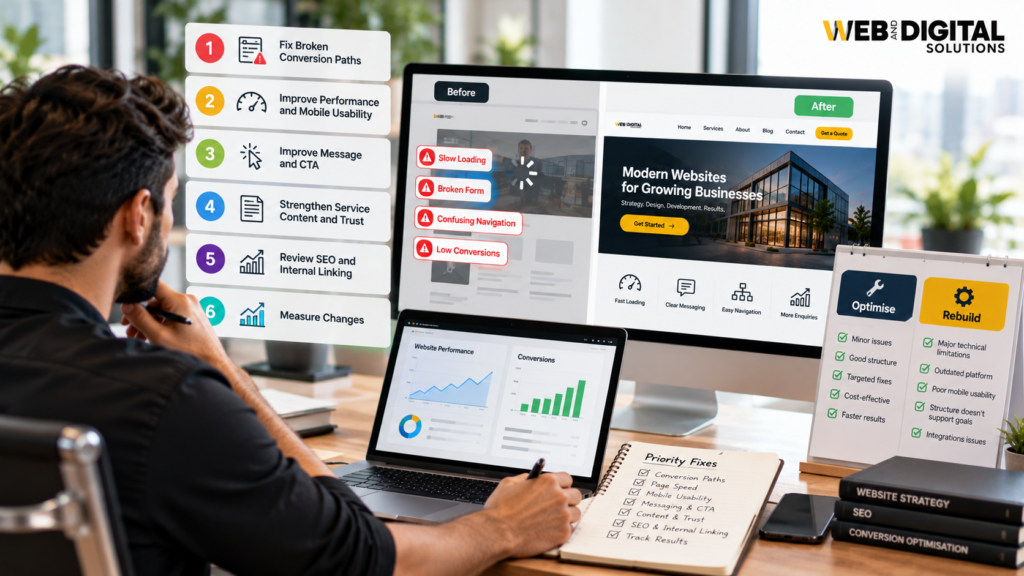
Not every issue deserves the same level of attention. Prioritise problems according to their impact on customers and business outcomes, rather than making changes simply because they are easy to notice.
A practical starting point is:
- Fix broken conversion paths first. If forms, booking links, telephone links or checkout processes do not work, resolve those issues before focusing on cosmetic improvements.
- Address major performance and mobile usability problems. Prioritise pages that are slow, unstable or difficult to use.
- Improve the message and CTA. Make sure visitors understand the offer and can identify the next step.
- Strengthen service content and trust. Answer important customer questions and provide genuine evidence of credibility.
- Review SEO and internal linking. Make sure relevant pages are discoverable and aligned with the searches they target.
- Measure changes. Compare conversion data before and after updates, allowing for traffic volume, lead quality and other factors that may influence results.
This approach creates a more evidence-based improvement process. It also helps businesses avoid paying for a complete redesign when a smaller, targeted fix may solve the immediate problem.
When Does a Website Need Optimisation—and When Is a Rebuild Necessary?
Some website conversion problems can be addressed through targeted improvements. Compressing images, clarifying a headline, repairing a form or simplifying navigation may be sufficient when the underlying website is technically sound.
A larger redesign or redevelopment may be more appropriate when the existing platform has serious technical limitations, the site structure no longer supports the business, mobile usability issues are widespread or essential integrations cannot be maintained reliably.
Before committing to a rebuild, identify the actual problems, review available performance data and define the outcomes the new website needs to support. A redesign should solve specific business and user problems—not simply introduce a different visual style.
How Web & Digital Solutions Can Help
Improving website performance requires more than changing colours or adding another call-to-action button. It involves understanding how visitors use the website, identifying technical and usability barriers, and making changes that support the business’s objectives.
Web & Digital Solutions provides web design and development services for businesses looking to improve their online presence through responsive design, purposeful website structure, performance-conscious development and user-focused functionality.
If your website is difficult to navigate, underperforming on mobile devices or failing to turn relevant visitors into enquiries, explore our Web Design and Development Services in London, Ontario.
Final Thoughts
Website conversion problems are not always obvious. A site can remain online, receive traffic and look professional while slow pages, unclear messaging, broken forms or confusing navigation quietly undermine its ability to generate enquiries.
The most effective starting point is to identify where visitors experience friction, fix the problems that interrupt important actions and measure the results. Some businesses may need only targeted improvements, while others may benefit from a more substantial redevelopment.
A website should make it easier for potential customers to understand your offer, trust your business and take the next step. When technical performance, useful content and user experience work together, your website is better positioned to support sustainable business growth.
Frequently Asked Questions
1. Why is my website not generating leads?
A website may fail to generate leads because of unclear messaging, slow loading times, confusing navigation, weak calls to action, broken contact forms or irrelevant traffic. Reviewing website analytics and testing the complete enquiry journey can help identify the main barriers.
2. What are common website conversion problems?
Common website conversion problems include slow page speed, poor mobile usability, confusing layouts, missing calls to action, lengthy forms, weak trust signals and broken conversion paths. These issues can make it harder for visitors to become customers.
3. Can website speed affect conversions?
Yes. Slow-loading pages can frustrate visitors and increase the likelihood that they leave before engaging with the content. Improving loading performance can create a smoother user experience, although conversion results also depend on the offer, audience and website content.
4. How do I know if my website has UX problems?
Look for signs such as visitors leaving important pages quickly, low engagement, form abandonment, difficulty navigating the website and poor conversion rates. Analytics, usability testing and session recordings can help identify where users encounter friction.
5. Should I redesign my website if it is not generating leads?
Not necessarily. Start by checking page speed, messaging, calls to action, forms, mobile usability and traffic quality. Targeted improvements may resolve the problem. A redesign may be appropriate if the existing website has broader structural, technical or usability limitations.
6. How can I improve my website conversion rate?
Start by defining your main conversion goals, identifying where visitors abandon the journey and fixing the most significant barriers. Improve page clarity, simplify forms, strengthen relevant calls to action, address performance issues and measure results after making changes.
7. How often should a business website be audited?
Review website performance and conversion tracking regularly, and test important forms and integrations after significant updates. A more comprehensive audit can be scheduled periodically or whenever traffic, conversions or website functionality show concerning changes.