Your business has a website. It looks professional, explains your services, and gives visitors a way to contact you. But there is one important question: Are potential customers actually finding it through Google?
A website can look excellent and still struggle to attract organic traffic, appear for relevant searches, or generate enquiries. If visitors mainly come from referrals, paid advertising, or social media, your website may not be reaching people who are actively searching for what your business offers.
So, does your website need SEO?
The answer depends on how well it performs in search results, whether it attracts the right audience, and whether organic visitors turn into enquiries or sales.
In this guide, we will cover 11 warning signs that may indicate your website needs search engine optimisation (SEO), how to identify the problems, and what you can do next.
What Does SEO Actually Do for a Business Website?
Search engine optimisation helps improve how your website is discovered, understood, and presented in organic search results.
A well-planned SEO strategy typically covers:
- Technical SEO: Making sure search engines can crawl and access important pages.
- On-page SEO: Improving page titles, headings, content, URLs, and internal links.
- Content optimisation: Creating useful pages that address what potential customers are searching for.
- Off-page SEO: Building relevant authority and credibility through quality references and links.
- Local SEO: Improving visibility for location-based searches and local customers.
For a small business, SEO can help attract people who are already looking for its products or services. However, results depend on competition, website condition, search demand, and the quality and consistency of the work.
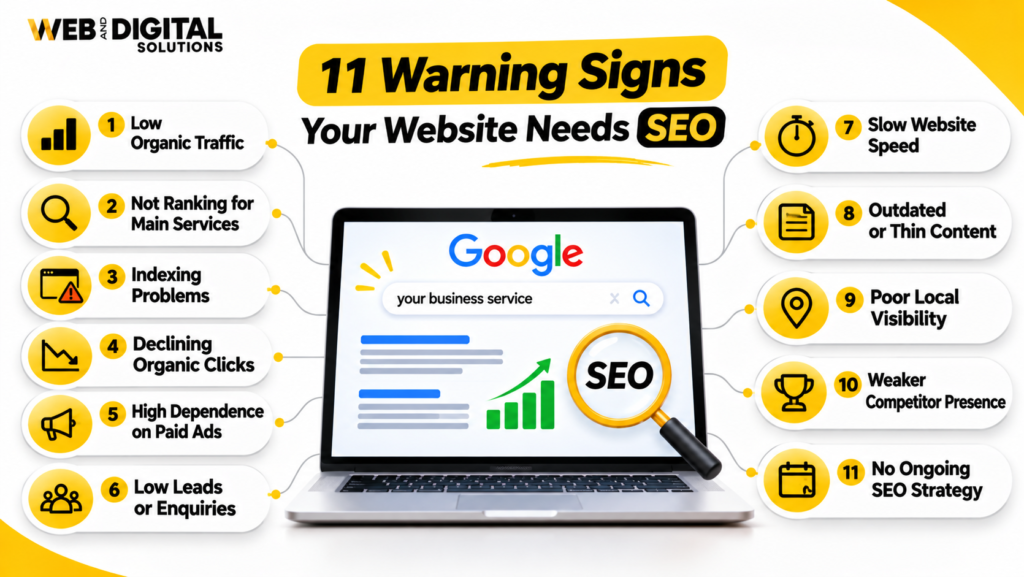
11 Warning Signs Your Website May Need SEO
1. Your Website Gets Very Little Organic Traffic
Organic traffic refers to visitors who reach your website through unpaid search engine results.
If your website receives very few visitors from Google, it may not be appearing for enough relevant searches. This can happen when your pages are not optimised, your website has limited useful content, or search engines have difficulty discovering and understanding your pages.
How to check:
Open Google Search Console and review the Performance report. Select a suitable date range and examine:
- Total clicks from Google Search.
- Total impressions.
- Average click-through rate (CTR).
- Average position.
- Which pages and search queries generate visibility.
Compare recent performance with an earlier period of similar length. Look for patterns rather than judging the website from a single day or week.
What to do: Identify your most important services and check whether dedicated, relevant pages exist for them. Optimise those pages around the searches your potential customers actually use.
2. Your Website Does Not Appear for Your Main Service Keywords
Imagine you run a plumbing company, but your website does not appear when someone searches for plumbing services in your target area.
That is a visibility problem.
Your website should have a realistic opportunity to appear for searches closely connected to your services, products, and locations. If competitors consistently appear while your business remains difficult to find, your keyword targeting and page relevance may need attention.
How to check:
Search for your main services using relevant phrases and locations. Also review the queries in Google Search Console to see which terms already generate impressions.
Do not rely on one manual Google search. Results can vary by location, device, personalisation, and competition.
What to do: Map important keywords to relevant pages. Each key service should have a clear page that explains what you offer, who you serve, and where you operate.
3. Your Website Has Indexing Problems
A page generally needs to be indexed before it can appear in Google’s organic search results.
If important service pages, product pages, or location pages are not indexed, potential customers may not be able to find them through Google.
Common reasons include:
- Accidental
noindexdirectives. - Incorrect robots.txt restrictions.
- Canonical tags pointing to other URLs.
- Duplicate or low-value pages.
- Server errors or inaccessible pages.
- Weak internal linking that makes pages difficult to discover.
How to check:
Use Google Search Console’s URL Inspection tool to examine important URLs. Review the Page Indexing report for patterns affecting multiple pages.
Remember that submitting a sitemap or requesting indexing does not guarantee that Google will index a page.
What to do: Investigate the reason for each important page’s indexing status before making changes. Technical fixes should address the actual cause rather than simply resubmitting URLs.
4. Your Organic Clicks Are Declining
A website can remain indexed and still lose organic traffic.
If clicks from Google are declining over time, your business may be losing search visibility or attracting fewer visits from the searches it previously performed well for.
Possible reasons include:
- Ranking declines for important keywords.
- Competitors publishing stronger or more relevant content.
- Changes in search demand.
- Search result features reducing clicks.
- Technical issues affecting important pages.
- Outdated content that no longer satisfies search intent.
How to check:
Compare clicks and impressions in Google Search Console across equivalent periods. Review individual pages and queries to identify where the decline is happening.
A drop in clicks with stable impressions may suggest a CTR issue. Falling impressions may indicate reduced visibility or changing search demand. These are diagnostic clues, not definitive explanations.
What to do: Identify the affected pages, review their search intent and competitors, and prioritise improvements based on business value.
5. Your Website Content Does Not Answer Customer Questions
A page that only says what your business does may not provide enough information to help visitors make a decision.
Potential customers often search for details before contacting a business. They may want to understand pricing factors, service processes, benefits, timelines, differences between options, or common problems.
If your content does not address these questions, your website may miss valuable search opportunities and leave visitors without the information they need.
How to check:
Review your main service pages and ask:
- Does the page clearly explain the service?
- Does it address common customer questions?
- Does it explain who the service is suitable for?
- Does it provide useful details rather than generic claims?
- Does it give visitors a clear next step?
What to do: Improve existing pages with genuinely useful information. Create supporting articles where they serve a distinct search need, and link those articles naturally to relevant service pages.
6. Your Competitors Are Consistently Outranking You
If competing businesses appear above your website for important commercial searches, they may be capturing attention and potential enquiries that your business is missing.
This does not automatically mean they have a better business. Their pages may simply provide stronger relevance, clearer information, better technical accessibility, or more established authority for those searches.
How to check:
Identify three to five direct competitors and compare:
- Which service keywords they appear for.
- How their service pages are structured.
- Whether they publish useful supporting content.
- How clearly they target service locations.
- The quality and relevance of their backlink profiles.
What to do: Conduct a competitor and keyword gap analysis. Use the findings to identify realistic opportunities rather than copying competitors’ content or pursuing every keyword they rank for.
7. Your Website Attracts Visitors but Generates Few Enquiries
Traffic alone does not make an SEO campaign successful.
If people visit your website but rarely call, submit forms, request quotes, or make purchases, there may be a problem with the relevance of your traffic or the website’s conversion experience.
Potential issues include:
- Visitors arriving through irrelevant keywords.
- Unclear service descriptions.
- Weak calls to action.
- Complicated enquiry forms.
- Missing contact information.
- Poor mobile usability.
- Lack of trust signals or useful proof.
How to check:
Use GA4 and your form, call, or ecommerce tracking to understand what visitors do after arriving. Review landing pages, engagement, and tracked conversions.
Make sure conversion events are configured correctly before drawing conclusions from the data.
What to do: Improve the connection between search intent, landing-page content, and the action you want visitors to take. SEO and conversion optimisation should work together.
8. Your Website Has Poor On-Page SEO
On-page SEO helps search engines and visitors understand what each page is about.
If your website has missing or duplicated title tags, unclear headings, weak page descriptions, or poorly structured content, it may be harder for search engines to interpret the relevance of your pages.
Common warning signs include:
- Generic page titles such as “Home” or “Services”.
- Multiple pages targeting the same keyword without a clear purpose.
- Missing or confusing H1 headings.
- Thin service descriptions.
- Missing contextual internal links.
- URLs that do not clearly describe the page.
How to check:
Review your most important pages manually or use an SEO crawling tool to identify title, heading, canonical, and internal-link issues.
What to do: Optimise each page around a clear topic and search intent. Write descriptive titles, structure headings logically, and link related pages where it helps visitors navigate.
9. Your Website Is Difficult to Use on Mobile Devices
Many potential customers browse websites on smartphones. If your website is difficult to navigate on a smaller screen, visitors may leave before contacting you.
Mobile usability problems can include:
- Text that is difficult to read.
- Buttons that are too small or close together.
- Layouts that require horizontal scrolling.
- Slow-loading pages.
- Forms that are difficult to complete.
- Contact details that are hard to find.
How to check:
Visit your website on different mobile devices. Test navigation, service pages, forms, phone links, and important calls to action. You can also review Google’s PageSpeed Insights for performance diagnostics.
What to do: Fix usability issues that prevent visitors from accessing information or completing important actions. Prioritise real user experience over chasing a perfect testing score.
10. Your Website Has Few Relevant Backlinks or Online References
Backlinks are links from other websites pointing to your website. Relevant, trustworthy backlinks can help search engines discover pages and provide signals about a site’s authority.
If your competitors have stronger and more relevant backlink profiles, your website may face a disadvantage in competitive search results.
However, the number of backlinks alone does not determine SEO performance. Relevance, quality, context, and the overall website matter.
How to check:
Use tools such as Ahrefs or Semrush to review your backlink profile and compare it with relevant competitors. Look for:
- Relevant industry websites linking to competitors.
- Genuine local business and community references.
- Unlinked brand mentions.
- Relevant directories and professional associations.
- Potentially harmful or unnatural link patterns.
What to do: Focus on earning relevant links through useful content, partnerships, genuine business relationships, and legitimate industry or local references. Avoid buying large quantities of low-quality links.
11. You Have No Clear SEO Strategy or Performance Tracking
Perhaps the biggest warning sign is that you do not know whether your website is improving in organic search.
Publishing occasional blogs, changing page titles, or building random backlinks without a clear plan makes it difficult to understand what is working.
An SEO strategy should connect website improvements to measurable business objectives.
How to check:
Ask yourself:
- Do you know which keywords matter most to your business?
- Are your main services mapped to relevant landing pages?
- Do you track organic clicks and impressions?
- Can you identify which pages generate enquiries?
- Do you review technical SEO issues?
- Are SEO tasks prioritised based on their potential impact?
What to do: Build an SEO roadmap based on your website’s current condition, competition, business goals, and available resources. Track progress regularly and adjust priorities based on evidence.
Quick Self-Assessment: Does Your Website Need SEO?
Use this checklist to identify possible gaps in your website’s organic search performance.
| Warning sign | Yes / No |
|---|---|
| My website receives very little organic traffic. | |
| My business does not appear for important service searches. | |
| Important pages are not indexed by Google. | |
| Organic clicks have declined over time. | |
| My service pages contain limited or outdated information. | |
| Competitors consistently outrank my website. | |
| Website visitors rarely become leads or customers. | |
| My pages have weak titles, headings, or internal links. | |
| My website is difficult to use on mobile devices. | |
| My website has few relevant backlinks or references. | |
| I do not have a clear SEO strategy or reporting process. |
How to interpret your answers:
- 0–2 yes answers: Your website may have a reasonable starting foundation, but review any identified weaknesses and monitor performance.
- 3–5 yes answers: Several areas may need attention. A focused SEO review can help establish priorities.
- 6 or more yes answers: Your website may have multiple visibility, technical, content, or conversion gaps. Consider a comprehensive SEO audit.
This is a practical screening checklist, not a technical SEO score. A single serious issue, such as important pages being blocked from indexing, can deserve immediate attention even if you answered “yes” only once.
When Should You Invest in Professional SEO Services?
Not every website needs a large SEO campaign immediately. However, professional SEO support can be valuable when your business depends on search visibility and you lack the time, expertise, or resources to manage optimisation internally.
Consider getting professional help if:
- Your website has persistent technical or indexing issues.
- Your competitors dominate important commercial searches.
- You are launching a new website or expanding into new service areas.
- Your organic traffic has declined and the cause is unclear.
- You need a structured content and keyword strategy.
- You want to generate more qualified enquiries through organic search.
A professional SEO review should explain what is wrong, why it matters, which actions should be prioritised, and how progress will be measured.
At Web & Digital Solutions, we help businesses improve their search visibility through technical SEO, on-page optimisation, content strategy, and local SEO.
Explore our SEO Services in London, Ontario to learn how a structured optimisation strategy can support your business goals.
You can also explore our Local SEO Services if your business wants to reach customers in specific service areas.
Final Thoughts: Don’t Wait Until Your Website Stops Generating Leads
Your website should do more than exist online. It should help potential customers discover your business, understand your services, and take the next step.
Low organic traffic, weak keyword visibility, indexing problems, declining clicks, outdated content, and poor conversion performance are all reasons to investigate your SEO.
The best starting point is not blindly publishing more blogs or building more backlinks. It is understanding your website’s current performance, identifying the biggest gaps, and creating a practical plan to address them.
If you are unsure whether your website needs SEO, start with an audit. It can help you distinguish between technical problems, content gaps, ranking opportunities, and conversion issues.
Need help identifying what is holding your website back? Contact Web & Digital Solutions to discuss your website’s SEO requirements.
Frequently Asked Questions About Website SEO
1. How do I know if my website needs SEO?
Your website may need SEO if it receives little organic traffic, does not rank for relevant service keywords, has indexing issues, or generates few enquiries from search visitors. Reviewing Google Search Console, website analytics, and competitor visibility can help identify potential problems.
2. Can a website get traffic without SEO?
Yes. A website can receive visitors through paid advertising, social media, email marketing, referrals, and direct visits without relying heavily on organic search. However, SEO can help your website attract people who are actively searching for your products or services.
3. Is SEO important for small businesses?
SEO can be valuable for small businesses because it helps improve visibility when potential customers search for relevant products and services. Local SEO can also help businesses reach people searching within their service areas.
4. How long does it take to see SEO results?
SEO timelines vary depending on competition, website condition, industry, content quality, and the work being implemented. Some technical improvements may produce changes sooner, while building stronger visibility for competitive keywords can take several months or longer. No responsible SEO provider can guarantee a specific ranking timeline.
5. Can I do SEO myself, or should I hire an SEO company?
You can handle many SEO basics yourself, including keyword research, content improvements, internal linking, and monitoring Google Search Console. Hiring an SEO company may be helpful when your website has complex technical issues, competitive keywords, or requires a consistent strategy and implementation team.
6. What is the difference between SEO and paid advertising?
SEO focuses on improving visibility in unpaid organic search results, while paid advertising involves paying to display ads. SEO can build long-term organic visibility, whereas paid campaigns can generate visibility while the advertising budget is active. Both can support a broader digital marketing strategy.
7. What should an SEO audit include?
An SEO audit should review technical accessibility and indexability, website structure, page titles and headings, content quality, keyword targeting, internal links, backlink profile, mobile usability, performance, and organic search data. It should also provide prioritised recommendations based on business objectives.