
Why Is My Website Not Showing Up on Google? 10 Reasons and How to Fix Them
You have launched your website, published your pages, added your services, and perhaps even started investing in SEO. But when you search for your business or website on Google, nothing appears.
It is frustrating, especially when potential customers are searching online for the services you provide.
So, why is your website not showing up on Google?
There are several possible reasons. Google may not have discovered your website yet. It may have crawled your pages but decided not to index them. Your pages might be indexed but ranking too low to appear where customers can find them. Technical settings, website quality, content relevance, and competition can all influence visibility.
The important thing is to identify which problem you are actually experiencing before making changes.
In this guide, we explain 10 common reasons a website may not appear on Google, how to diagnose each issue, and what you can do to improve your website’s visibility.
First, Understand Why Your Website May Not Appear on Google
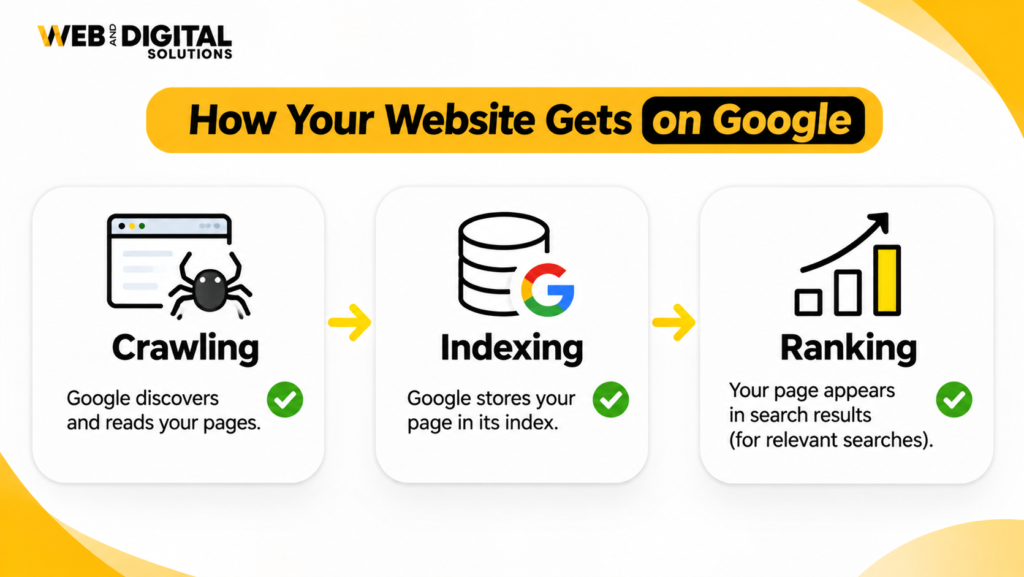
Before troubleshooting, understand three stages of Google’s search process: crawling, indexing, and ranking.
Crawling: Has Google discovered your website?
Google uses automated crawlers, including Googlebot, to discover pages and access their content. Google can find pages through links from other websites, internal links, and submitted sitemaps.
If Google has not discovered a page, it cannot evaluate that page for indexing.
Indexing: Has Google stored your page in its search index?
After crawling a page, Google may analyse its content and decide whether it should be included in its search index.
A page can be crawled but not indexed. This may happen because of duplicate content, quality concerns, technical signals, or other indexing decisions.
Ranking: Is your indexed page appearing for relevant searches?
Being indexed does not guarantee that a page will rank prominently.
Google evaluates many signals when determining which pages to show for a search query. Your website may be indexed but appear too far down the results to receive meaningful traffic.
This distinction matters: A website that is not indexed needs a different solution from one that is indexed but struggling to rank.
To begin, open Google Search Console and inspect your website’s indexing reports and individual URLs.
You can also try searching site:yourdomain.com in Google as a quick indication of whether pages from your domain appear. However, this search operator is not a complete or definitive indexing report. Use Search Console for a more reliable diagnosis.
10 Reasons Your Website Is Not Showing Up on Google
1. Your Website Is New and Google Has Not Discovered It Yet
If you recently launched your website, Google may not have discovered or crawled all your pages.
New websites often have limited external links, few internal connections, and little historical information available to search engines. As a result, discovery and indexing may take time.
This does not automatically mean something is broken.
How to check
- Open Google Search Console and verify your website property.
- Inspect your homepage using the URL Inspection tool.
- Check whether Google has discovered or crawled the URL.
- Review the Page Indexing report for any reported issues.
How to fix it
- Verify your website in Google Search Console.
- Submit your XML sitemap.
- Make sure your homepage links to important service and category pages.
- Add relevant internal links between related pages.
- Ensure important pages return a successful HTTP status code.
- Use URL Inspection to request indexing for important updated or newly published pages when appropriate.
Requesting indexing does not guarantee that Google will crawl or index a page. It simply submits the URL for consideration.
Give Google time to process the website and monitor its status instead of repeatedly submitting the same URL.
2. Your Website Is Blocking Search Engines Through Robots.txt
The robots.txt file provides crawling instructions to automated crawlers. If configured incorrectly, it can prevent Googlebot from accessing important website sections.
For example, a broad blocking rule may prevent Google from crawling pages that you want to appear in search results.
A typical robots.txt file is located at:
https://yourdomain.com/robots.txt
How to check
Open your robots.txt file and review whether important website directories or pages are blocked.
Look for rules such as:
User-agent: *
Disallow: /
This example blocks crawling across the entire site for compliant crawlers using that rule.
A rule like this may be intentional on a development website, but it can cause problems if accidentally left on the live website.
How to fix it
- Review all robots.txt directives.
- Remove unintended restrictions affecting important pages.
- Confirm that essential CSS and JavaScript resources can be accessed when required for rendering.
- Test important URLs using Google Search Console.
- Check that your live website does not contain staging restrictions.
Remember that robots.txt controls crawling, not guaranteed indexing. Blocking a URL does not reliably remove it from Google’s index if Google knows about the URL through other signals.
3. Your Website Pages Have a Noindex Tag
A noindex directive tells search engines that a page should not be included in their search index.
It can be implemented through a robots meta tag or an HTTP response header.
For example:
<meta name="robots" content="noindex">This instruction may be useful for private pages, certain internal pages, or development environments. However, if it appears on your homepage or important service pages unintentionally, those pages may not appear in Google search results.
How to check
Open the affected page and inspect its HTML source for a robots meta tag.
You can also use:
- Google Search Console URL Inspection.
- A website crawler such as Screaming Frog.
- Browser developer tools or an HTTP header checker.
How to fix it
- Identify which pages contain unintended
noindexdirectives. - Remove the directive from pages that should be indexed.
- Check your CMS and SEO plugin settings.
- Verify that the page is not also blocked from crawling.
- Inspect the updated URL in Search Console.
If Google previously processed the noindex instruction, the page may need to be recrawled before its indexing status changes.
4. Your XML Sitemap Is Missing, Incorrect, or Outdated
An XML sitemap helps search engines discover important URLs on your website.
It is particularly useful for larger websites, new websites, and websites with complex structures.
However, submitting a sitemap does not guarantee indexing. It is a discovery aid, not an instruction that forces Google to include every submitted page.
How to check
Open your sitemap, which may be available at:
https://yourdomain.com/sitemap.xml
Your actual sitemap location may differ depending on your CMS or SEO plugin.
Check whether:
- The sitemap loads successfully.
- Important canonical URLs are included.
- URLs return successful status codes.
- Redirected and broken URLs are excluded.
- Unintended noindex pages are not included.
- The sitemap reflects the current website structure.
How to fix it
- Generate or update your XML sitemap through your CMS or SEO plugin.
- Include important, indexable canonical URLs.
- Remove outdated, redirected, and error URLs.
- Submit the sitemap in Google Search Console.
- Monitor sitemap processing and any reported errors.
For websites with multiple content types, such as pages, blogs, products, and location pages, check that the relevant sitemap sections are included.
5. Your Website Has Duplicate Content or Incorrect Canonical Tags
Google may encounter multiple URLs containing identical or very similar content.
This can happen when websites have:
- HTTP and HTTPS versions.
- WWW and non-WWW versions.
- URL parameters.
- Duplicate service pages.
- Similar location pages.
- Multiple URLs for the same content.
Canonical tags help indicate which URL should be treated as the preferred version.
For example:
<link rel="canonical" href="https://yourdomain.com/seo-services/">If a page accidentally points its canonical tag to an unrelated URL or an old version, Google may select a different URL for indexing.
How to check
Inspect important pages and review:
- The declared canonical URL.
- Google’s selected canonical URL in Search Console, where available.
- Redirect behaviour.
- Duplicate page content.
- URL variations.
How to fix it
- Decide which URL should be the preferred version.
- Use consistent internal links pointing to that version.
- Implement appropriate canonical tags.
- Redirect duplicate URL versions where appropriate.
- Consolidate genuinely overlapping pages when doing so improves content quality and clarity.
Do not use canonical tags as a substitute for fixing every duplicate URL problem. Choose the appropriate combination of redirects, canonicalisation, and content consolidation.
6. Your Website Has Server Errors or Pages Are Returning the Wrong Status Codes
Even when a page is correctly configured, Google may struggle to access it if the server frequently returns errors.
Common HTTP status codes include:
| Status code | Meaning | What to investigate |
|---|---|---|
| 200 | Successful request | Page loads correctly |
| 301 | Permanent redirect | Destination is relevant and accessible |
| 404 | Page not found | Missing or incorrectly linked URL |
| 403 | Access forbidden | Permissions or security restrictions |
| 500 | Internal server error | Server or application issue |
| 503 | Service unavailable | Temporary downtime or server overload |
A website that frequently experiences server errors may have crawling and availability problems.
How to check
- Inspect important URLs in Google Search Console.
- Crawl the website to identify error responses.
- Review hosting and server logs where available.
- Check uptime and server availability.
- Test redirects and final destination URLs.
How to fix it
Work with your hosting provider or developer to resolve server-side problems. Restore missing pages where appropriate, redirect permanently moved content to relevant destinations, and make sure important pages return the correct response.
Do not redirect every broken URL to the homepage. The destination should make sense for the original page.
7. Your Website Has Weak, Thin, or Unhelpful Content
Technical accessibility does not automatically make a page valuable enough to appear in search results.
Google may choose not to index some pages when they offer little unique value or substantially overlap with other content.
Examples include:
- Very short service pages with little useful information.
- Duplicate location pages with only the city name changed.
- Automatically generated pages without meaningful content.
- Blog posts that repeat existing information without adding useful detail.
- Pages that do not satisfy the searcher’s intent.
How to check
Review your important pages and ask:
- Does the page answer the questions visitors are likely to have?
- Does it explain the service or topic clearly?
- Does it provide useful information beyond generic descriptions?
- Is it substantially different from other pages on the website?
- Does it match the search intent of its target keywords?
How to fix it
Improve pages with useful, relevant information rather than adding unnecessary word count.
For service pages, explain the actual services, process, customer benefits, service areas, and next steps.
For blog content, answer the main question thoroughly, organise the information logically, and provide practical guidance.
For local pages, include genuinely useful information about the location and service availability.
The goal is to create pages that deserve to be discovered, not simply pages that contain more keywords.
8. Your Website Has Poor Internal Linking and Important Pages Are Difficult to Discover
Google uses links to discover pages and understand relationships between content.
If important service pages are buried deep within your website or have no meaningful internal links pointing to them, they may be harder for crawlers and visitors to discover.
These pages are sometimes described as orphan pages when they have no internal links from other pages on the website.
How to check
Use a website crawler to identify:
- Orphan pages.
- Important pages with very few internal links.
- Broken navigation links.
- Pages buried too deeply in the website structure.
- Internal links pointing to redirected URLs.
How to fix it
Build a logical internal linking structure.
For example:
- Link from your homepage to your main services.
- Link from service category pages to individual service pages.
- Link relevant blog posts to related services.
- Use descriptive anchor text.
- Keep important pages accessible through useful navigation.
A well-organised internal linking structure improves discoverability and helps visitors move naturally between related information and services.
9. Your Website Is Indexed but Does Not Rank for Your Target Keywords
This is one of the most misunderstood Google visibility problems.
Your website may be indexed correctly, but that does not mean it will appear on the first page of search results.
Google evaluates relevance, content quality, competition, and many other signals when determining rankings.
For example, your homepage may be indexed, but it may not rank for a competitive commercial keyword because the page does not sufficiently match the search intent or compete with the other results.
How to check
Use Google Search Console to review:
- Queries generating impressions.
- Average position for relevant queries.
- Pages receiving organic clicks.
- Search visibility for priority services.
- Changes in impressions and clicks over time.
Also review the actual search results for your target keywords to understand what types of pages are ranking.
How to fix it
- Match each important keyword to the right page.
- Improve page relevance and content depth.
- Strengthen internal links.
- Address technical SEO issues.
- Build relevant, authoritative references and backlinks naturally.
- Improve page titles and descriptions to communicate relevance.
- Create useful supporting content around your core services.
Avoid targeting every keyword on your homepage. Important services and distinct search intents often deserve dedicated pages.
10. Your Website Has Manual Actions, Security Issues, or Other Search Visibility Problems
Sometimes a website’s visibility problem is related to issues that are not immediately obvious from a normal website crawl.
Google Search Console provides reports that can help identify certain manual actions and security problems.
Examples include:
- Manual action notifications.
- Hacked content or injected pages.
- Malware or deceptive content warnings.
- Unusual spam-related issues.
- Security problems affecting visitors.
Not every ranking decline is caused by a penalty, and not every indexing problem indicates a security issue. These reports should be checked rather than making assumptions.
How to check
Open Google Search Console and review:
- Manual Actions.
- Security Issues.
- Page Indexing.
- URL Inspection.
- Performance reports.
How to fix it
If Google reports a manual action, follow the specific instructions provided, correct the identified issue, and submit a reconsideration request when appropriate.
If a security problem is reported, work with your developer or hosting provider to remove malicious content, secure the website, update vulnerable software, and follow Google’s recovery guidance.
Once the issue is resolved, continue monitoring the affected pages and reports.
How to Diagnose Why Your Website Is Not Showing Up on Google
Instead of making random changes, use this simple diagnostic process.
| What you find | Likely issue | Next step |
|---|---|---|
| Homepage is not discovered | Discovery or crawling problem | Check links, sitemap, and crawl access |
| URL is blocked by robots.txt | Crawling restriction | Review robots.txt rules |
| URL has a noindex directive | Indexing restriction | Remove unintended noindex |
| Crawled but not indexed | Indexing decision or page issue | Review content, duplication, and technical signals |
| Duplicate, Google chose different canonical | Canonicalisation issue | Check canonical and URL consistency |
| Indexed but receives no impressions | Relevance, demand, or ranking issue | Review target queries and page content |
| Receives impressions but few clicks | Search appearance or relevance issue | Review titles, descriptions, and search intent |
| Traffic dropped suddenly | Possible technical, content, or search change | Compare dates, pages, and Search Console reports |
These are diagnostic clues, not automatic explanations. Use URL Inspection and the relevant reports to confirm what is happening on your website.
A Practical Google Indexing Checklist for Website Owners
Before assuming your website has an SEO problem, work through this checklist.
Technical accessibility
-
Your website loads over HTTPS.
-
Important pages return a successful HTTP status code.
-
Robots.txt does not block important content.
-
Important pages do not contain unintended noindex directives.
-
Googlebot can access essential page resources.
Indexing configuration
-
Your XML sitemap is accessible.
-
Important canonical URLs are included in the sitemap.
-
Canonical tags point to the intended URLs.
-
Duplicate URL versions are handled appropriately.
-
Google Search Console has been verified.
Website structure and content
-
Important pages have relevant internal links.
-
Service pages contain useful, unique information.
-
Blog content satisfies its intended search intent.
-
Important pages are not orphaned.
-
Navigation makes key pages easy to discover.
Search visibility and monitoring
-
URL Inspection has been used for important pages.
-
Page Indexing reports have been reviewed.
-
Manual Actions and Security Issues have been checked.
-
Search queries and impressions are being monitored.
-
Technical and content issues are reviewed regularly.
When Should You Consider a Professional SEO Audit?
If you have checked the basic settings and your website still does not appear in Google, a deeper technical and SEO assessment may be necessary.
This is particularly relevant when:
- Your entire website has disappeared from search results.
- Important service pages are not being indexed.
- Google reports unexpected canonical or crawling issues.
- Organic traffic has declined significantly.
- A website redesign or migration has affected visibility.
- Your pages are indexed but do not attract relevant search traffic.
- You cannot identify why your website is not generating organic enquiries.
A professional SEO audit can examine technical accessibility, indexing configuration, website architecture, content relevance, keyword targeting, internal linking, and competitive visibility.
For businesses targeting London, Ontario, and surrounding communities, local search optimisation may also be important. The audit should consider whether your website and Google Business Profile accurately reflect the services and locations you actually serve.
Final Thoughts: Getting Your Website on Google Starts With Finding the Right Problem
If your website is not showing up on Google, the first step is not to publish more blogs or add more keywords. It is to identify whether Google has discovered your website, whether your pages are eligible for indexing, and whether they are competitive enough to rank for relevant searches.
A crawling problem requires a different solution from an indexing issue. An indexing issue requires a different solution from a ranking problem.
Start with Google Search Console, review your technical settings, check the quality and relevance of your pages, and build a website structure that makes important content easy to discover.
At Web & Digital Solutions, we help businesses improve their search visibility through structured SEO strategies, technical website improvements, and content optimisation. If your website is struggling to appear in relevant searches, explore our SEO services in London, Ontario or learn more about our local SEO services.
The objective is not simply to get your website indexed. It is to help the right customers discover the right pages when they are searching for the services your business provides.
Frequently Asked Questions About Websites Not Showing Up on Google
1. Why is my website not showing up on Google?
Your website may not appear because Google has not discovered it, cannot crawl it, has not indexed its pages, or does not rank it prominently for your target searches. Check Google Search Console to identify the specific issue before making changes.
2. How do I know if Google has indexed my website?
You can use the site:yourdomain.com search operator for a quick indication, but it is not a complete indexing report. Google Search Console’s URL Inspection tool provides more detailed information about the indexing status of individual URLs.
3. How long does it take for Google to index a new website?
There is no guaranteed indexing timeframe. It depends on factors such as website discovery, crawl accessibility, content, and Google’s indexing decisions. Submit an XML sitemap, create useful internal links, and monitor indexing through Search Console.
4. Why is Google not indexing my website even after submitting a sitemap?
A sitemap helps Google discover URLs but does not guarantee indexing. Pages may remain unindexed because of noindex directives, robots.txt restrictions, duplicate content, canonical issues, server errors, or other indexing decisions.
5. Can robots.txt prevent my website from appearing on Google?
Yes. Robots.txt can prevent Google from crawling important pages. However, blocking crawling does not necessarily prevent a URL from appearing in search results if Google discovers it through other sources. Review your robots.txt file and indexing settings together.
6. What is the difference between crawling, indexing, and ranking?
Crawling is when Google discovers and accesses a page. Indexing is when Google processes and includes a page in its search index. Ranking determines where that page appears for relevant search queries. A page can be crawled without being indexed, and indexed without ranking prominently.
7. Why is my website indexed but not ranking?
Indexing does not guarantee prominent search visibility. Your page may not sufficiently match the target search intent, may face strong competition, or may need improvements to content relevance, website structure, and overall search visibility. Review Google Search Console queries and the actual search results to identify opportunities.